MakeMusic discontinued Finale in August 2024. After 35 years, the notation software that shaped how music was taught and written across the world is no longer being developed, sold, or supported.
If you are a music teacher, you already know this. What you may still be figuring out is what to do next.
This guide is written specifically for educators – not composers, not engravers, not recording engineers. Teachers who manage classes, build assignments, give feedback on student work, and need a tool that fits inside a school environment. We will compare the leading Finale alternatives, walk through how to migrate your existing files, and explain exactly what to look for in a replacement.
Why Finale's Discontinuation Is a Classroom Emergency
For individual composers, Finale's shutdown is disruptive but manageable. You can take your time, evaluate options, and migrate at your own pace.
For music teachers, the timeline is different. You have classes running now. Students who need access today. Assignments built on templates you have refined over years. And a file library in .mus and .musx format that will become harder to open with every macOS and Windows update that passes.
Here is what "discontinued" means in practical terms for schools:
- No new licenses are available for purchase
- No security updates, which creates IT compliance problems
- OS compatibility will erode over time, eventually breaking the software entirely
- Students cannot be directed to download or purchase a discontinued product
- Any school still running Finale is on a forced migration timeline, with the deadline set by Apple and Microsoft, not by you
The question is not whether to replace Finale. It is which replacement will work best for how music teachers actually run a classroom.
What Music Teachers Need From a Finale Alternative
Before comparing tools, it helps to be precise about what the classroom context actually demands. Most notation software reviews are written for professional musicians. Teacher requirements are different.
A Finale alternative for classroom use needs to:
- Work on any student device without individual paid installations
- Integrate with your existing LMS (Google Classroom, Microsoft Teams, Canvas)
- Handle assignment distribution, collection, and feedback inside the platform
- Meet school data privacy requirements (COPPA for under-13, FERPA for student records)
- Have a learning curve that works for students at your grade level
- Support the full assignment cycle -- theory exercises, composition projects, and ideally performance assessment
Most of Finale's competitors were built for the same professional market Finale served. Only one platform was built specifically for music classrooms.
The Best Finale Alternatives for Music Teachers: Compared
Flat for Education
Best for: K-12 and higher education music classrooms
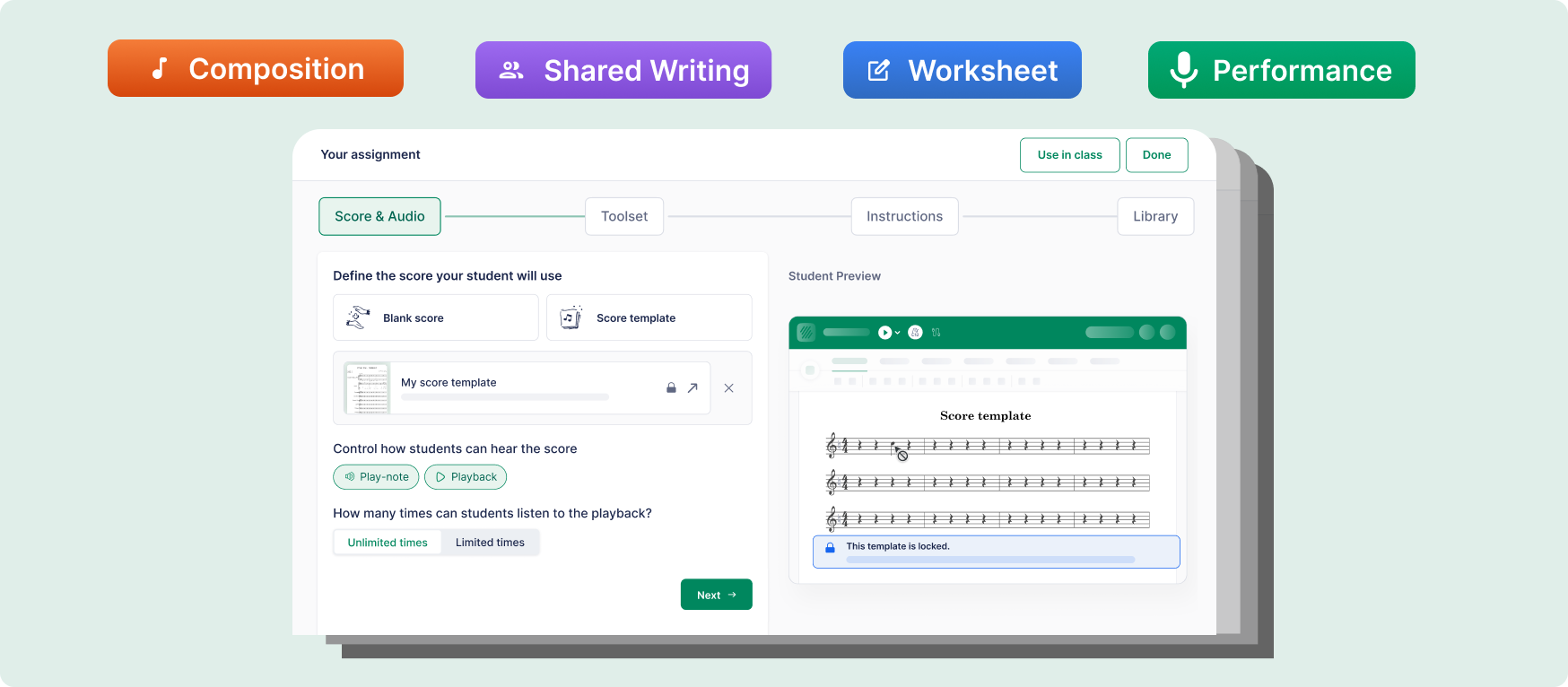
Flat for Education is the only notation platform on this list designed from the ground up for music teachers. It is browser-based (no installation), connects directly to Google Classroom and Microsoft Teams, Schoology and Canvas, and handles the full assignment lifecycle inside a single platform.
What it does that Finale never did:
- Native Google Classroom and Microsoft Teams integration: rosters import in minutes, assignments distribute and collect automatically
- Auto-grading for music theory exercises: chord identification, interval labeling, voice-leading rules checked instantly, giving students feedback before they even submit
- Composition assignments with in-score timestamped feedback: leave a comment on bar 7, highlight a passage, annotate a specific note choice, all inside the score itself
- Performance assignments: students record audio directly against a score using their device microphone, submitting notation and audio together for a single integrated assessment
- Full COPPA and FERPA compliance out of the box: no addendum, no IT negotiation for most districts
- Flat for Education is priced per teacher with per-student licensing available – see current pricing here.
What it does not have:
Flat for Education is not trying to be professional engraving software. For high-end score production and publishing, it is not Sibelius or Dorico. For classroom music education, that tradeoff is almost always worth it.
MusicXML import: Yes – your Finale library migrates cleanly (see migration guide below)
Sibelius
Best for: Teachers who primarily prepare their own scores, conservatoire-level programs
Sibelius is the most direct professional comparison to Finale. Powerful, mature, and widely used in professional music. Avid offers education pricing.
For classroom management, however, Sibelius was not built for it. It is installed desktop software with no native assignment workflow. Student submissions require manual export, file sharing, download, annotation in a separate document, and re-upload. Every step is a point of failure.
Key limitation for teachers: No integrated submission, feedback, or performance assessment system. You will need to build your own workflow infrastructure around it, which is exactly the problem most teachers are trying to escape.
Better for: Teachers who want a professional notation tool for their own work and have a separate classroom management system they are happy with.
MuseScore
Best for: Budget-constrained schools that need basic notation access
MuseScore is free, capable, and actively maintained. Students can install it on personal devices at no cost. For schools with no software budget, it removes the access barrier entirely.
The classroom limitation is significant, though: MuseScore is personal productivity software. There is no LMS integration, no assignment system, no in-score feedback, no performance assessment. A MuseScore-based classroom means rebuilding the same patchwork workflow -- shared drives, email submissions, external annotation -- that most teachers are trying to leave behind.
Key limitation for teachers: Free software is not free if it costs you 140+ hours per year in workflow overhead.
Noteflight Learn
Best for: Schools already invested in the Noteflight ecosystem
Noteflight Learn is browser-based and includes some classroom management features. It is a legitimate classroom option, and teachers in districts with existing Noteflight licenses may have good reasons to stay.
Where it falls short for many teachers is feedback depth, performance assessment capability, and the overall quality of the student composition environment compared to Flat for Education.
Dorico
Best for: Advanced students pursuing music professionally
Dorico (Steinberg) is arguably the most powerful notation software available today. Its engraving quality is exceptional. For a student heading to a conservatoire, building familiarity with Dorico is genuinely valuable.
For K-12 classroom use, it is not the right fit. The learning curve is steep, pricing for student access is significant, and there is no classroom management layer.
Feature Comparison Table
| Feature | Flat for Education | Sibelius | MuseScore | Noteflight Learn |
|---|---|---|---|---|
| Browser-based (no install) | Yes | No | No | Yes |
| Google Classroom integration | Yes | No | No | Partial |
| Microsoft Teams integration | Yes | No | No | No |
| Assignment distribution + collection | Yes | No | No | Partial |
| Auto-grading | Yes | No | No | No |
| In-score timestamped feedback | Yes | No | No | Limited |
| Performance assessment | Yes | No | No | No |
| COPPA / FERPA compliant | Yes | Check with vendor | No (public platform) | Yes |
| MusicXML import (from Finale) | Yes | Yes | Yes | Yes |
| Price per teacher / year | $79 | Varies | Free | Varies |
| Per-student licensing required | No | Yes | No | Depends on plan |
How to Migrate Your Finale Library to Flat for Education
This is the most practical section for teachers with years of Finale files they need to preserve. The good news: MusicXML is an open standard that Finale exports cleanly, and Flat for Education imports it fully.
Step 1: Export from Finale as MusicXML
While you still have working access to Finale:
- Open each score in Finale
- Go to File > Export > MusicXML
- Save as .mxl (compressed) or .xml (uncompressed) -- both work
- Organize exported files by category: assignment templates, student examples, repertoire scores
Prioritize your most-used files first. Assignment templates and score resources you use every term should be exported before anything else.
Step 2: Import into Flat for Education
- Log in to your Flat for Education account
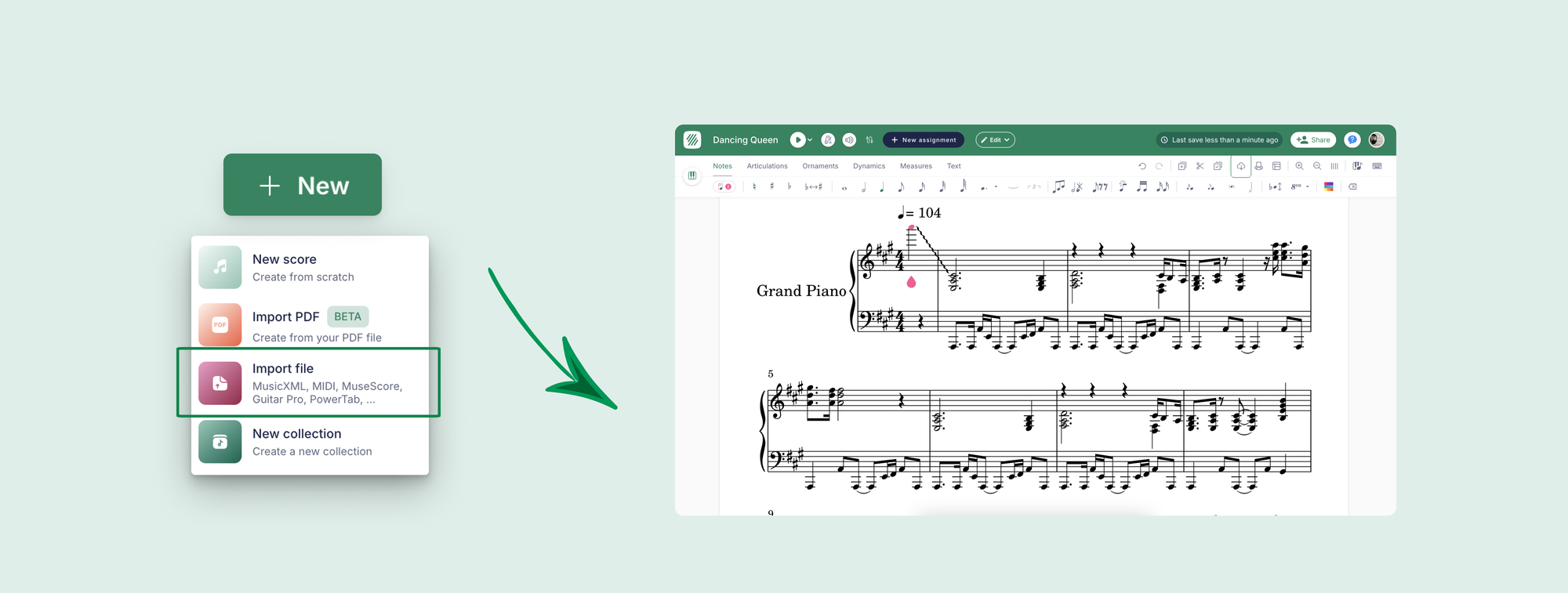
- Click New Score > Import
- Upload your .mxl or .xml file
- Flat for Education will render the score -- review for any formatting adjustments needed
What transfers cleanly: Notes, rhythms, dynamics, articulations, slurs, ties, lyrics, chord symbols, tempo markings, time and key signatures.
What may need adjustment: Some Finale-specific text formatting, custom page layouts, and complex graphical elements. Musical content will be intact.
Step 3: Build Your Assignment Library
Once your core scores are imported, use Flat for Education's assignment builder to turn them into distributable assignments with instructions, parameters, and auto-grading criteria attached. This is the step that turns a score library into a classroom infrastructure.
Real Classroom Impact: What the Switch Looks Like
Sarah Chen, a middle school music director managing 94 students across three sections, made the move from a Finale-and-spreadsheet workflow to Flat for Education. Her feedback turnaround went from 9 days to 2 days. Full-class performance assessments that previously consumed 3 weeks of instructional time per semester now run monthly. A seventh-grade student who had been submitting simple melodies because complex notation was too technically demanding submitted a four-part chorale arrangement after the platform removed the barrier between what she could hear and what she could notate.
The platform did not change how she teaches. It removed the infrastructure that was getting in the way of teaching.
Making the Case to Your Administration
If you need IT or administration approval, here is the short version:
Finale is discontinued software. Continuing to rely on it exposes the school to gradual compatibility failure as OS updates erode support. Moving to a COPPA and FERPA compliant, browser-based platform eliminates installation overhead, simplifies device management, and gives students access from any school or home device.
Flat for Education starts at $99 per teacher per year, fits within standard instructional materials budgets, and requires no per-student licensing. COPPA and FERPA compliance means district IT approval is typically a single email.
Frequently Asked Questions
What is the best Finale alternative for music teachers? Flat for Education is the strongest Finale alternative specifically for K-12 and higher education classrooms. It is browser-based, integrates with Google Classroom and Microsoft Teams, includes auto-grading and performance assessment, and is fully COPPA and FERPA compliant. For teachers who primarily need professional score engraving for their own work rather than classroom management, Sibelius is a strong option.
Can I open my old Finale files in a new program? Yes. The best approach is to export your Finale files as MusicXML (.mxl or .xml) while you still have access to Finale, then import them into your new platform. Flat for Education, Sibelius, MuseScore, and Noteflight all support MusicXML import. Notes, rhythms, dynamics, and most musical content transfer cleanly.
Why was Finale discontinued? MakeMusic announced the discontinuation of Finale in August 2024, citing the challenges of modernizing a 35-year-old codebase. The software is no longer being developed, sold, or supported. Existing licenses continue to function but will not receive further updates.
Is Flat for Education free? Flat for Education offers a 30-day free trial with no credit card required. After the trial, it is $99 per teacher per year, with student add-ons for $6 per year. Site licenses are also available for larger schools and districts. A limited free version of Flat.io is also available, but lacks the classroom management features in the Education plan.
Does Flat for Education work with Google Classroom? Yes. Flat for Education integrates directly with Google Classroom. Class rosters import automatically, assignments distribute and collect through the platform, and submissions appear in the teacher's dashboard organized by class and student.
What happens to my Finale files now that it is discontinued? Finale files (.mus, .musx) will continue to open in Finale as long as your operating system remains compatible. However, future macOS and Windows updates may eventually break compatibility. The safest approach is to export all important files as MusicXML now, while you still have reliable access.
Is Flat for Education FERPA compliant? Yes. Flat for Education is fully FERPA and COPPA compliant. Student data is handled in accordance with US education privacy law, and the platform does not require any additional data processing agreements for most district deployments.
How long does it take to switch from Finale to Flat for Education? Most teachers complete Google Classroom integration and their first assignment setup within 30 minutes. MusicXML file migration depends on the size of your library – a focused set of 20 to 30 core assignment scores can typically be migrated and rebuilt as assignments in a single afternoon.
The Bottom Line
Finale served music education for 35 years. Its discontinuation is a genuine loss, and the transition is real work. But it is also an opportunity to move to a platform that does what Finale never did: handle the classroom infrastructure that music teachers spend enormous time managing manually.
If you are ready to see what a classroom-first platform looks like, the 30-day free trial connects to your existing roster in minutes and requires no credit card.