
The Short Answer
Flat suits composers and students who work across multiple devices, want real-time collaboration, or prefer something browser-based with no installation required. Native Mac and Windows desktop apps are also in development.
MuseScore suits composers who work from a single desktop machine, want deep engraving control, and don't need collaboration or cross-device access.
Neither is universally better. They make different trade-offs.

What Is Flat?
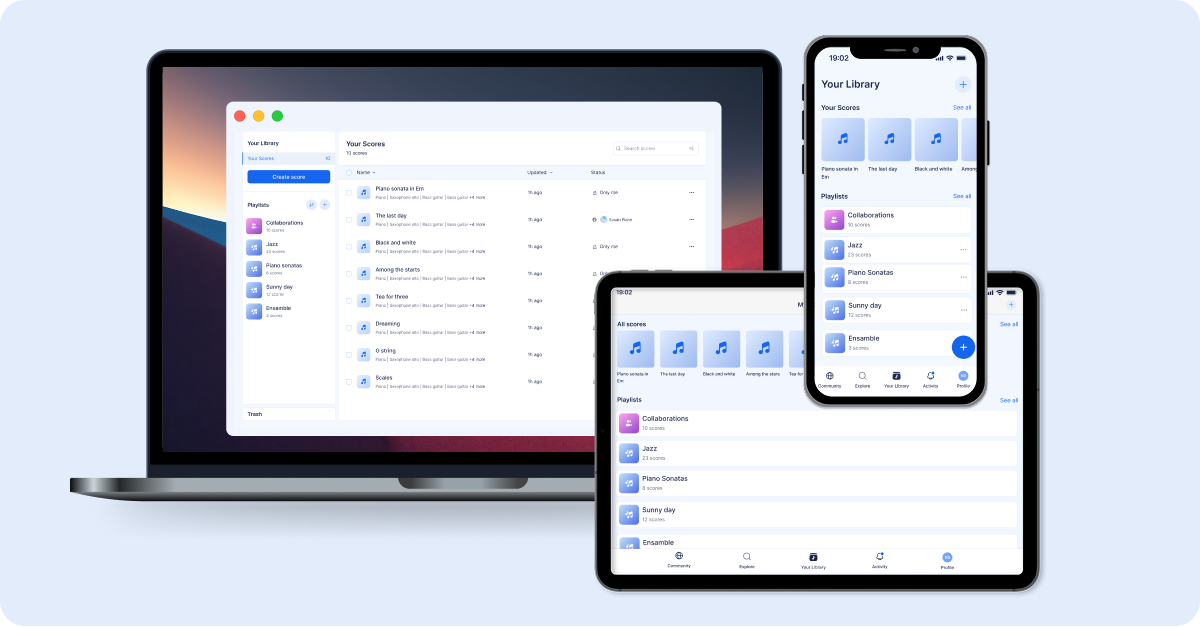
Flat is a browser-based music notation tool that works on Mac, Windows, Linux, Chromebook, iOS, and Android — no installation needed. Native desktop apps for Mac and Windows are coming soon, which will add an offline option alongside the existing browser experience.
The free tier covers the core editor with up to 15 scores. Paid plans add unlimited scores, advanced instruments, audio export, and more. A notable feature is real-time collaboration: multiple users can edit the same score simultaneously, comment on specific measures, and share scores with people who don't have an account.
Flat is used across a wide range: students, hobbyist composers, arrangers, and educators.
What Is MuseScore?
MuseScore Studio is a free desktop application for Windows, Mac, and Linux — one of the most widely used free notation tools available. MuseScore.com, the companion platform, hosts a large library of community scores and adds online features via a separate subscription.
Version 4 brought a redesigned interface, the Muse Sounds sample library, and performance improvements. It handles complex notation well — irregular time signatures, microtonal accidentals, cue notes, condensed scores, and large orchestral arrangements. It's a strong option for composers who want professional-level tools without the cost of commercial software.
Head-to-Head Comparison
Ease of Use
Flat has a minimal, modern interface that most users find quick to pick up. Getting from a blank score to the first few bars doesn't require much prior knowledge of the software.
MuseScore is more complex. Version 4 improved the experience, but it's still a feature-dense application — palettes, style settings, and engraving options take time to navigate. That complexity pays off for advanced users, but the learning curve is steeper.
Collaboration
Flat supports real-time collaboration: multiple people can edit the same score at once, with changes visible live. Scores can be shared by link in edit or view-only mode.
MuseScore doesn't have real-time collaboration. The standard approach is to export a file, share it, and receive edits back — functional for solo work, but limited for anything collaborative.
Platform & Device Support
Flat runs in any modern browser across all major operating systems, including Chromebook. Dedicated iOS and Android apps are available. Mac and Windows desktop apps are in development and coming soon.
MuseScore runs on Windows, Mac, and Linux as a desktop install. It doesn't work in a browser or on Chromebooks. The mobile apps for iOS and Android are viewer-only, not editors.
For anyone working across multiple devices — or in an environment where Chromebooks are standard — this is currently one of the more significant practical differences between the two tools. That gap will narrow once Flat's desktop apps are available.
Notation Features
MuseScore offers more depth in engraving and notation control. Advanced articulations, microtonal accidentals, cross-staff notation, condensed scores, and fine-grained layout control are all more developed. For scores intended for professional publication or complex orchestral work, MuseScore has more to offer.
Flat covers standard notation thoroughly — dynamics, articulations, ties, slurs, trills, grace notes, multiple voices, chord symbols, lyrics, and guitar tabs. For the majority of use cases, that's enough. The gap becomes relevant mainly at the professional engraving end.
Playback Quality
MuseScore's Muse Sounds library is one of the better free playback options available, particularly for strings, piano, and choir.
Flat's playback is accurate and responsive, available directly in the browser without any additional downloads. The quality is good across standard instruments, though it doesn't match Muse Sounds at the top end.
File Import/Export
Both tools support MusicXML and MIDI import and export — the standard formats for moving scores between applications. Flat exports PDF, MP3, and WAV. MuseScore additionally exports SVG and reads Guitar Pro files natively.
Both handle MusicXML imports from Finale and Sibelius reasonably well, though complex scores often need some manual cleanup after import.
Price
- Flat: Free tier up to 15 scores; paid plans from ~$4.99/month
- MuseScore Studio: Free desktop software with no score limit; MuseScore.com PRO ~$6.99/month for online features
MuseScore's desktop software is completely free with no meaningful restrictions. Flat's free tier is functional but capped at 15 scores.
Community
MuseScore.com has a large, established community and an extensive catalog of shared scores — useful for reference, learning, and discovery.
Flat's community is smaller but active, particularly among students and younger composers. Support response times are generally good, and the score-sharing tools work well for getting feedback.
Side-by-Side Comparison
| Flat | MuseScore Studio | |
|---|---|---|
| Platform | Browser, iOS, Android + Mac & Windows apps coming soon | Windows, Mac, Linux (desktop only) |
| Chromebook | ✅ | ❌ |
| Real-time collab | ✅ | ❌ |
| Free tier | ✅ (15 scores) | ✅ (unlimited) |
| Installation | None required (desktop apps coming soon) | Required |
| Notation depth | Strong (standard range) | Very deep (pro engraving) |
| Playback quality | Good | Excellent (Muse Sounds) |
| MusicXML import | ✅ | ✅ |
| Learning curve | Gentle | Moderate to Steep |
| Paid plans | From ~$4.99/month | MuseScore.com PRO ~$6.99/month |
When Flat Tends to Work Better
- Working across Chromebook, iPad, phone, or multiple machines
- Collaborating with others on the same score
- Wanting to share scores with people who don't have notation software
- Preferring a quick, low-friction setup
- Migrating from Finale or Sibelius and looking for a simpler transition

When MuseScore Tends to Work Better
- Working consistently from one Windows or Mac machine
- Needing advanced engraving and layout control
- Wanting the best free playback quality available
- Making regular use of MuseScore.com's score library
- Working solo without collaboration requirements
What About Flat for Education vs MuseScore?
The classroom context adds different considerations — device management, Google Classroom integration, student accounts, and assignment workflows. We've covered that comparison separately: Flat for Education vs MuseScore for classrooms.
If you're still evaluating options more broadly, our guide to what to look for in collaborative music notation software covers the key criteria worth thinking through before committing to a tool.
The Bottom Line
MuseScore is a mature, powerful desktop application that rewards the learning investment. Flat is a more accessible, flexible platform that works across devices and prioritises collaboration — and is expanding its desktop presence. Which one makes more sense depends on your setup and how you work.
The free tier on both tools is genuinely usable. Try Flat at flat.io — no installation needed.