You write a careful crescendo from mf to ff, press play, and the phrase blooms. That's what this update is about — playback that finally has the dynamic range your notation deserves.
We've just rewritten the whole velocity-to-gain curve. Soft passages are noticeably softer, loud passages noticeably louder, and hairpins have actual shape. Here is what changed and why it sounds more musical.
Why linear velocity-to-gain didn't do justice to music dynamics
Until recently, the playback engine mapped MIDI velocity to audio gain linearly. A velocity of 50 produced roughly half the gain of a velocity of 100. That math is clean, but it doesn't match how we actually hear.
When you place a pp on a measure, you're asking for a specific character, not "lower number on a fader." Linear scaling forces every dynamic marking through a straight line from 0 to 1, which flattens the extremes. ppp and pp end up closer to mf than they should, and ff and fff stop having room to bloom. The usable band of music dynamics gets compressed toward the middle.
If you compose with a wide dynamic palette, this shows up everywhere. Quiet intros that are not quiet enough. Climaxes that don't climb. Hairpins that look right on the page and barely exist in the ears.
How our ears actually hear loudness
Human hearing is logarithmic. Doubling the physical amplitude of a sound doesn't feel like "twice as loud." It feels like a noticeable step, not a dramatic one. That's why decibels, the standard unit for loudness, are logarithmic too.
The practical consequence: in a linear velocity-to-gain map, the same velocity delta produces very different perceived changes depending on where you sit in the range. Moving from velocity 5 to 15 used to yield about 9.5 dB, which is enormous. Moving from 100 to 110 yielded about 0.8 dB, which most listeners can't reliably detect.
So a crescendo sitting in the upper half of the range could gain twenty velocity units across a phrase and still arrive at the downbeat sounding roughly identical to where it started. The notation was expressive; the playback just couldn't keep up.
The new map for music dynamics
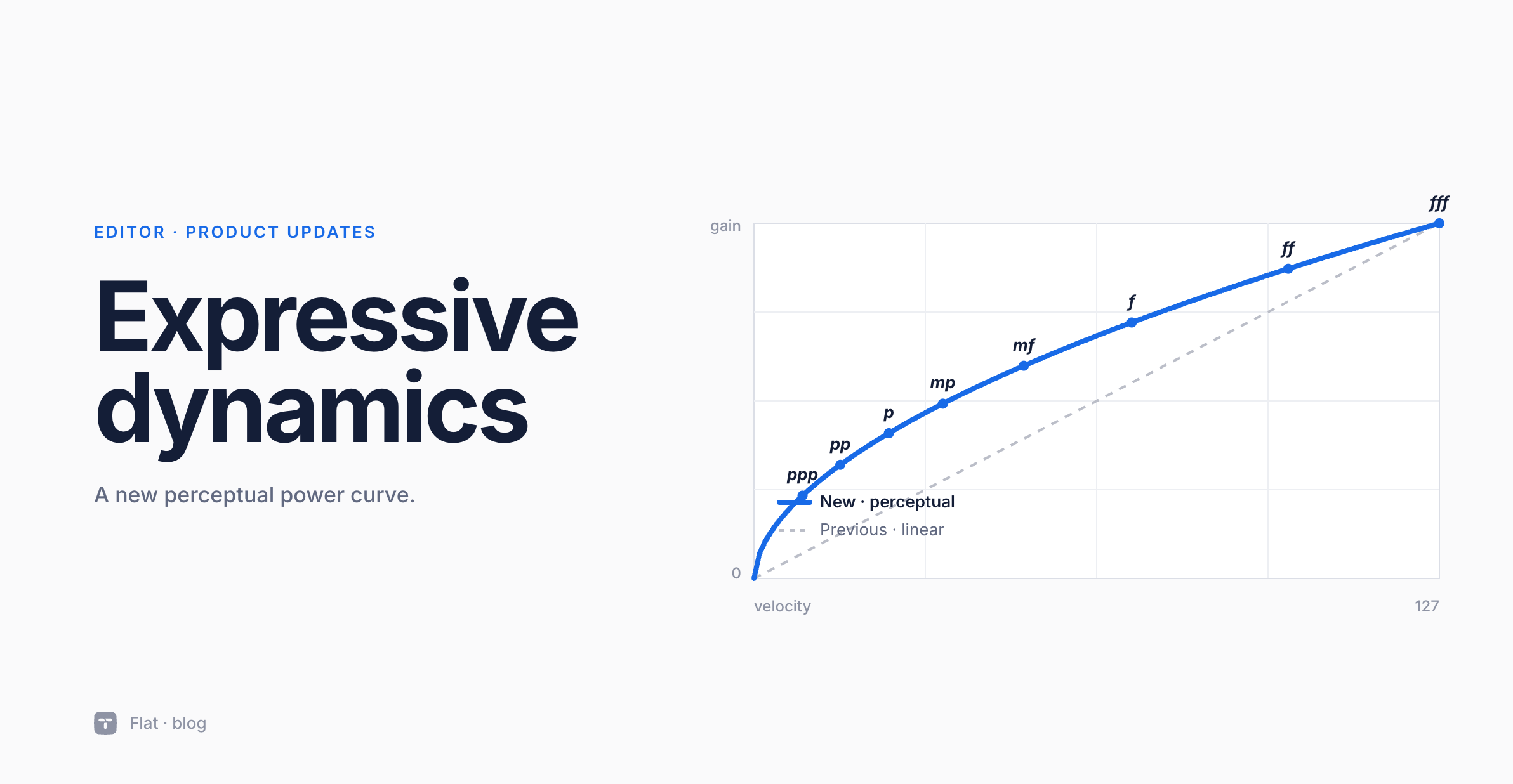
We replaced the linear mapping with a perceptual power curve. In plain terms: the gain you hear now grows at a rate closer to how your ear perceives loudness, so equal steps in notation produce more uniform steps in what you hear.
mf at velocity 50 stays put as the reference point, so existing scores keep their centre of gravity. Everything softer than mf is now noticeably quieter, and everything louder than mf is noticeably louder.
Here is the new map, with the difference in dB compared to the previous behavior:
| Dynamic | Velocity | Change |
|---|---|---|
| ppp | 9 | -7.4 dB (quieter) |
| pp | 16 | -4.9 dB (quieter) |
| p | 25 | -3.0 dB (quieter) |
| mp | 35 | -1.5 dB (quieter) |
| mf | 50 | 0.0 dB (identical) |
| f | 70 | +1.5 dB (louder) |
| ff | 99 | +3.0 dB (louder) |
| fff | 127 | +4.0 dB (louder) |
The total usable range is wider, which gives your music dynamics more room to actually mean something from one marking to the next. A pp should now sound like a genuine hush, and an ff should land with weight, not a mild lift.
Crescendos and decrescendos you can hear
Wedges benefit from the new curve, and we went further and changed how they're rendered. The default velocity range spanned by a wedge is now wider, so a crescendo from p to f actually crosses a distance worth calling a crescendo. Longer wedges that stretch over several measures hold their shape across the entire span rather than front-loading the change into the first bar.
The effect is most obvious on phrases that start quietly and arrive loud, or the opposite. You should hear a real build rather than a nudge, and the shape should feel continuous rather than stepped.
No changes to how you notate wedges. Drop a hairpin, attach your dynamics at either end, and the playback engine does the rest.
Try this in Flat: hear the difference
The short score below has a crescendo climbing to a peak and a diminuendo easing it back down. Before this update, both were barely perceptible on playback, especially sitting in the upper half of the dynamic range where a handful of velocity units translated to less than a decibel. Press play and hear what the same markings sound like under the new curve.
To try it on your own material, a quick test takes about two minutes.
- In any score, write a single line four to eight measures long.
- Place a pp at the start, a hairpin underneath, and an ff at the end.
- Press play.
Repeat with ppp and fff to hear the new extremes. If you've been quietly compensating for flat playback by writing less expressive markings than you wanted, this is a good moment to put your original intent back in the score. Arrangers working on large ensembles should try it on a passage where one section swells while another holds steady. The contrast is the thing the old engine was hiding.
What this means for your existing scores
Nothing in your existing scores needs to change. The new mapping runs on the same notation, so every dynamic marking you've already written now has more headroom and more floor. If you've been composing for a while, it's worth revisiting older pieces with the new engine on. Some of them have been sitting on more dynamic range than you could hear.
Ready to hear it? Open any score, press play, and let the dynamics do what you wrote them to do. Try Flat free. The new curve is on by default, right in your browser, with nothing to install.