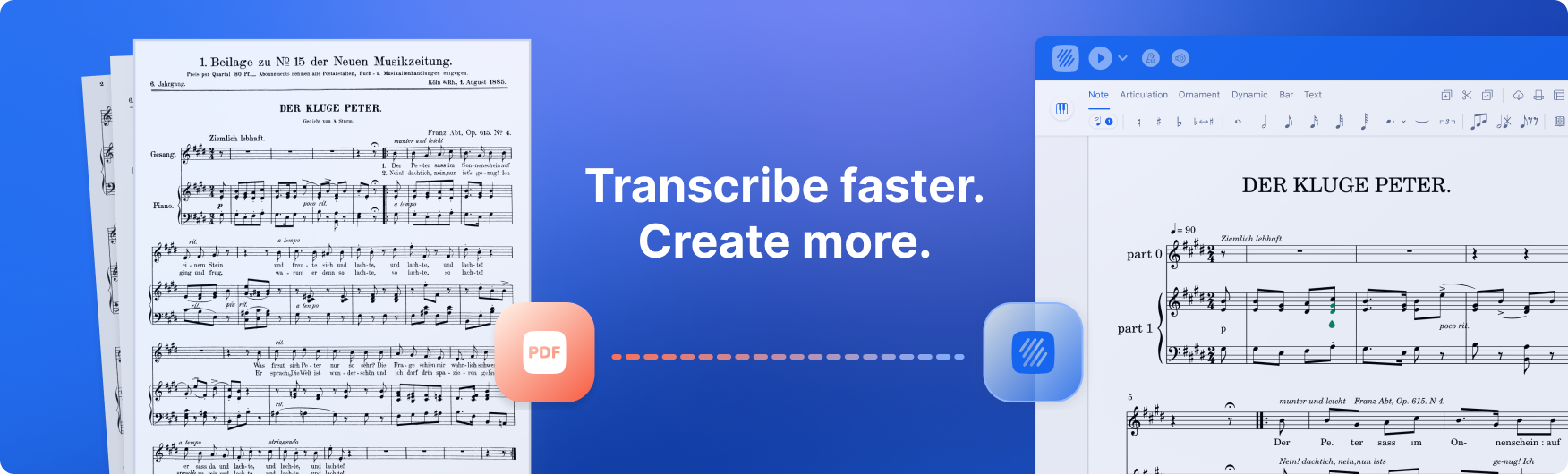
One of the most requested features from our community is finally here: you can now import PDF sheet music into Flat and convert it into editable files.
If you're already working with PDFs — printed parts, scanned scores, existing files — PDF Import makes it easy to bring that music into Flat and pick up right where you need to. Instead of re-entering a score note by note or switching tools, you go straight to editing, arranging, transposing, or composing.
PDF Import adds a new way to work with existing music inside Flat. It removes the extra steps that starting from a PDF normally requires, and keeps your workflow in one place.
PDF Import is now available on Flat Web, iOS, and Android.
Whether you're adapting a score, studying a piece, or reshaping material for a new project — PDF Import saves time and lets you work directly from the music you already have.
Import your scores for editing in Flat
Importing a PDF into Flat is straightforward. Upload your file and Flat converts it using our import system into an editable score. The result opens directly in the editor, ready to edit, arrange, or adapt to your project.
PDF Import works directly from your score library and is available to all users — free and paid, on web and mobile.
What you get:
- An immediately usable editable score
- No need to re-enter the music note by note
- The same Flat editor you already know
How it works:
- Go to your score library
- Click New Score → Import PDF
- Upload your file
- Your PDF is converted into an editable score, ready to use
📸 Mobile bonus: import by photo
On mobile, you have an additional option that makes the process even faster: instead of uploading an existing file, you can take a photo of your score directly from the app and import it into Flat immediately.
Perfect for moments when you have the music right in front of you — a printed part at rehearsal, a score on the stand, or pages from a book — and want to get started without extra steps.
The process is the same: your photo is converted into an editable score, ready to use in the Flat editor. For best results, make sure the page is well lit, flat, and fully in frame.
PDF Import: credits and pricing
PDF Import works on a credit system. You can purchase one-time credit packs to import your scores.
| Credit pack | Price | Pages included | Price per page |
|---|---|---|---|
| Small | $9.99 | 30 pages | $0.33 |
| Medium | $17.99 | 70 pages | $0.26 |
| Large | $49.99 | 300 pages | $0.17 |
These packs are useful if you work with PDFs occasionally or need more pages than your plan includes. If you import PDFs as part of your regular workflow, Flat Power is the better option:
- Monthly plan: Includes 10 PDF pages per month, so you can import scores without worrying about credits, plus access to all premium features.
- Annual plan: Best value for heavy use with 20 PDF pages per month, full premium access, and easier management if you import frequently or work with long scores.
- Lifetime plan: Includes 20 PDF pages as a one-time allocation (these credits do not renew), along with full premium access — ideal if you want premium features permanently and occasional PDF imports without a recurring subscription.
Not sure what you need? No stress — credits don't expire as long as your account is active.
Supported notation and best practices
PDF Import works best with clean, standard PDF scores that are well scanned or digitally exported. Flat handles the bulk of the conversion automatically, but the quality of the result depends on the structure and clarity of the imported PDF. Handwritten music, tablature, or very complex formats may require manual adjustments after import — that's normal and expected.
What works best
Import works best with clean, high-quality PDFs that follow standard music engraving conventions.
Your PDF will give the best results if it:
✅ Uses standard notation with clearly visible staves
✅ Is well scanned or digitally exported (high resolution, straight pages)
✅ Has a consistent layout across all systems and pages
✅ Contains one score per file
Supported notation
PDF Import currently supports a wide range of common notation elements, including:
| Category | Supported elements |
|---|---|
| Clefs | Treble, bass, C clefs (alto and tenor), including mid-measure clef changes |
| Key signatures | All keys in the Western system |
| Time signatures | 6/2, 5/2, 4/2, 3/2, 2/2, alla breve, 6/4, 5/4, 4/4, C, 3/4, 2/4, 12/8, 9/8, 7/8, 5/8 and more |
| Rhythms and note values | Whole to 32nd notes and rests, up to 3 dots, all tuplets |
| Pitches | Up to ±5 ledger lines |
| Cue notes | Recognised when used across full measures |
| Multi-measure rests | Any length, represented with H-bar notation |
| Dynamics | pppp to ffff, sf, sfz, cresc, decresc, dim, hairpins |
| Articulations | Slur, tie, staccato, staccatissimo, tenuto, accent, marcato |
| Ornaments | Trill, mordent, turn, inverted turn, tremolo, grace note (acciaccatura coming soon) |
| Technical markings | Up bow, down bow, fingerings, piano pedal (Ped, *) |
| Barlines | Single, double, final, repeat (start/end), combined repeats |
| Repeat symbols | Volta brackets, Da Capo, Dal Segno, Coda, Al Fine |
| Structure | System and page breaks, section detection |
| System structure | Voice group separation, basic support for variable system count |
| Rehearsal marks | Letters and numbers |
| Text | Assigned to notes; supports English, French, German, Italian; simple lyrics |
| Transposing instruments | Recognised and interpreted solo or in ensemble |
| Percussion | 1-, 2-, and 5-line staves; simple noteheads (cross, open, filled) |
Common issues and how to avoid them
| Issue | Likely cause | Fix |
|---|---|---|
| Import fails | PDF exceeds your available credits | Import a smaller file or upgrade your plan |
| Empty or incomplete score | Handwritten music, chord charts, text-only sheets | Use printed scores with standard staves |
| Wrong notes or rhythms | Low-resolution or distorted scans | Use high-quality scans with straight pages |
| Missing staves or instruments | Inconsistent system count between braces | Keep system structure consistent |
| Missing key or time signatures | Not repeated in every system | Repeat key and time signature in every system |
| Mixed or wrong voices | Dense polyphony in a single staff | Review rhythms carefully after import |
Best practices before importing
✅ Export from notation software when possible (Sibelius, Finale, MuseScore, Dorico, etc.)
✅ When scanning, use 300 dpi or more and ensure pages are flat and well lit
✅ Crop pages cleanly (no margins, shadows, or cut-off staves)
✅ Keep note size, spacing, and grouping consistent
✅ Avoid double-page or landscape PDFs
✅ Use one file per score
After import: what to expect
Even with a clean PDF, some manual adjustments are normal.
What typically works well:
- Notes, rests, clefs, key signatures, and time signatures
- Dynamics and simple articulations
- Overall musical structure
What may need adjustments:
- Rhythms in polyphonic or very dense passages
- Text and lyric alignment
- Less common ornaments or tuplets
- Instrument names, transpositions, or layout details
Playback is a good way to quickly spot issues, and all imported scores are fully editable in Flat.
If something looks off
- You can manually edit anything after import
- Try a cleaner version of the PDF if needed
- If issues persist, write to us with the original file at hello@flat.io — PDF Import is still in an experimental phase and your feedback directly helps improve it.
📬 Share your experience
Have feedback on PDF Import? Something that worked well, or didn't meet your expectations? We'd love to hear it. Your input helps us improve the feature and decide what comes next.
👉 hello@flat.io
Thank you for being part of the Flat community.