
You’ve likely noticed the Editor feels more responsive lately. Over the past few weeks, we’ve been progressively rolling out a complete rework of Flat’s score display engine.
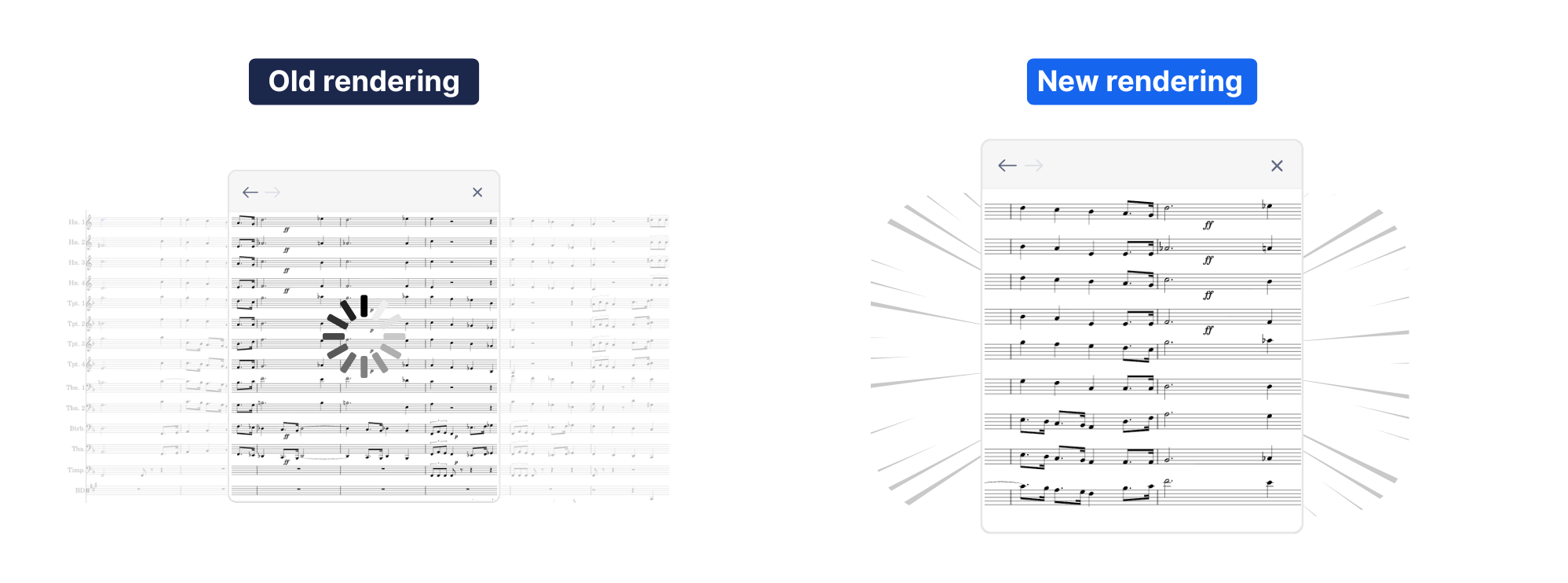
By releasing this update gradually, we were able to monitor real-time performance and refine the code based on your feedback. The result is a brand-new foundation that makes the Editor quicker to load and smoother to use, even on lower-powered devices.
In this article, we’ll walk you through exactly what changed, why we rebuilt the engine from the ground up, and what these improvements mean for your next composition.

🚀 Why We Rebuilt the Engine from the Ground Up
Over the years, we’ve heard from composers working on large scores or using low-powered devices: sometimes the editor didn’t keep up. Even a slight delay between inserting a note and seeing it appear could break the creative flow—and we knew we had to fix that.
So, our tech team went deep—rebuilding the entire rendering engine at the heart of Flat’s Editor. We revisited almost 10 years of work, restructured our architecture, and tested multiple rendering strategies to deliver the fastest, smoothest, and most responsive version of Flat yet.
⚙️ How the New Score Display Works
A new architecture that separate formatting from painting
In order to show a page from the middle of a score, the Editor first needs to figure out which measures go on all the pages leading up to that one. We don’t need to draw those earlier pages, but we still have to calculate what’s on them to know where the current page begins.
In the old engine, Flat had to paint every page—even the ones you weren’t looking at—just to figure this out.
With the new system, we’ve split the logic into two parts:
- One part figures out what goes on each page (formatting).
- The other part paints only what’s visible.
That means if you jump to page 100 in a score with 100+ pages, Flat can now calculate the layout without redrawing all the previous 99 pages. This saves a huge amount of processing—especially in large ensemble scores—and makes the Editor much faster and more responsive.
You’ll notice the difference most when editing long pieces or jumping around inside big projects.
Starting the display as soon as possible
After you make a change in the score, a lot happens behind the scenes:
- The cursor moves to the next note or rest
- The toolbar updates to reflect your new options
- The edits are saved locally
- The change is sent to the server so collaborators can see it
- And the Editor updates the score so you can see the note you just added
In the previous system, all of these actions happened at the same time. That meant the display update had to wait its turn—especially noticeable on low-powered devices, where that delay could feel endless.
We’ve now reorganized Flat’s workflow to prioritize what matters most: showing your note on screen. The Editor now pauses the other tasks just long enough to display your update immediately—so you see the result of your action as fast as possible.
📄 Bonus: PDF Export Is Faster Than Ever
In the previous version of the Editor, exporting to PDF involved two steps:
- First, Flat generated an SVG version of the score—just like what you see on screen while editing.
- Then, it used a separate tool to convert that SVG into a PDF.
Thanks to our new architecture—where formatting and painting are handled separately—we can now skip that extra step. Instead of generating a SVG and then converting it, we can directly produce the PDF from the score data itself. That means faster, more reliable exports with one less step in between.
💡 Learn how to export your scores in this guide.

🚀 What’s Next: Expanding Your Creative Toolkit
While this engine overhaul provides a massive boost in speed, we aren’t stopping there. The new separation of formatting and painting acts as a launchpad for both performance and musical depth.
Exploring the Future of Rendering
Right now, Flat uses SVG (vector graphics) to ensure your scores look crisp at any zoom level. However, we are already experimenting with low-level graphics APIs like WebGL—the same technology that powers high-end design tools like Figma. By offloading rendering tasks to your device’s GPU, we aim to make even the most massive orchestral scores feel as light as a lead sheet.
A Reimagined, Intuitive Toolbar
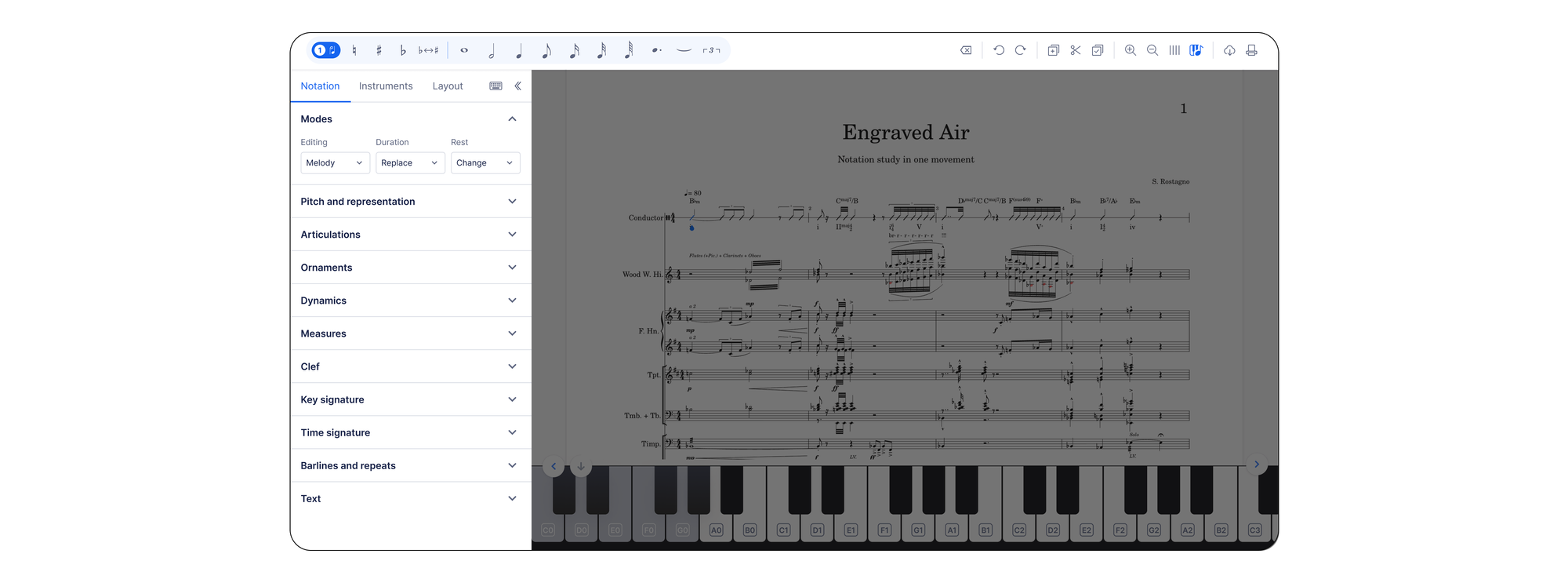
We’re rebuilding the editor to get rid of the clutter. Instead of searching through tabs to find an articulation or ornament, we are making the editor more responsive to your workflow. The goal is simple: fewer clicks and a cleaner workspace.
This redesign will roll out first on the web version, with the mobile app update following shortly after.
Here is a first look at the redesigned toolbar and the new collapsible side panel:
New Musical Horizons
We’re also hard at work on requested features that bring more nuance to your compositions:
- Complex Rhythmic Precision: Support for 16th-note tuplets is on the way, giving you the flexibility to write intricate contemporary rhythms without technical workarounds.
- Intuitive Playback Logic (A Tempo): We are refining our playback engine to better understand your musical intent. Soon, adding an a tempo mark will automatically reset the playback speed to the original tempo following a ritardando or accelerando. No more manual tempo adjustments—just natural, expressive flow.
This engine update was built hand-in-hand with feedback from our community, and it's just the beginning of a faster, more musical Flat.

✨ This update was built hand-in-hand with feedback from our community, and now it’s ready for you. Jump in, explore the faster Editor, and see how much smoother composing feels.
💬 Tell Us What You Think
Have feedback? Something feels even faster—or still a little slow? Let us know. Your insights helped make this update possible, and they’ll shape the next one too.
Thanks for growing with us.