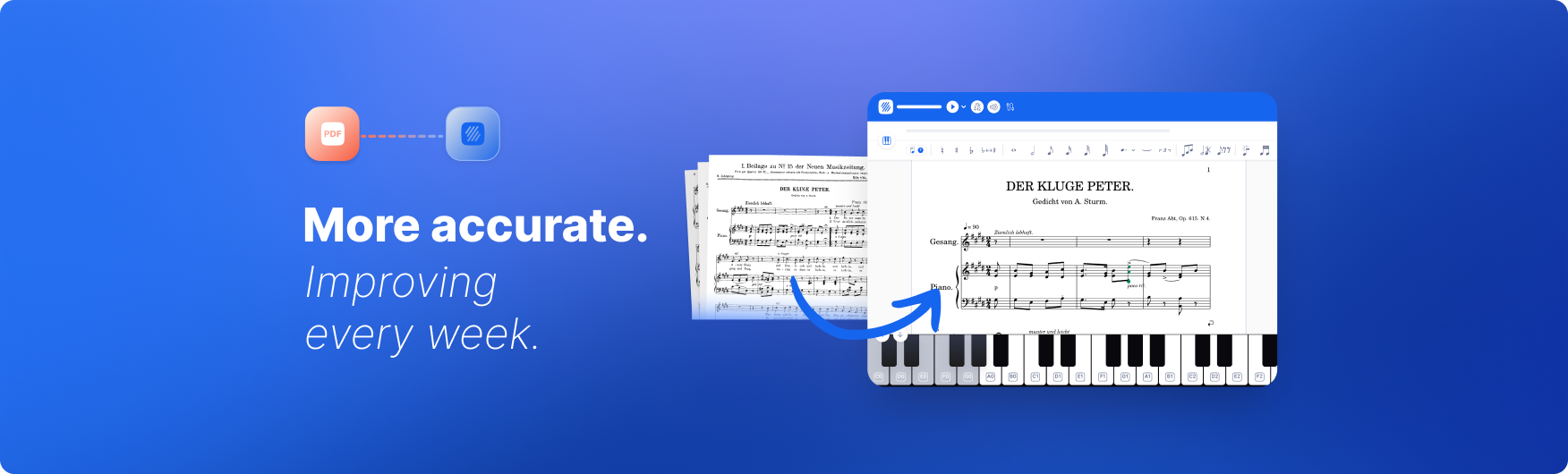
You have a photo of a piece you want to play, and you would rather not type it back in note by note.
Maybe it is a page from a songbook, a part a friend sent you, or an old score you found in a drawer. Whatever it is, you scan sheet music in Flat and it opens as a real score you can play, edit, transpose, and share.
Teaching a computer to do that is one of the harder things we have built - and we have just reached a milestone we are proud of. The engine reading your music is now entirely our own: an AI model we designed and trained from scratch, in-house. It reads more of your music, and reads it more accurately, than the engine we launched with. New to it? Here is how scanning works and how to get the best results.
What's new when you scan sheet music
Every PDF and photo you import now runs through Flat's own model. Compared with the third-party engine we used when the feature first launched, it brings:
- More notation, properly understood. Chord symbols come in as real, editable chords - not plain text. Measure repeats, rhythm slashes, and tempo and metronome markings are recognized too.
- Better lyrics support. Words land under the right notes, syllable by syllable, and text like chord names and dynamics attaches to the notes it belongs to - so vocal parts come in ready to read and sing.
- Lyrics and text in more languages, including Japanese, Korean, and Chinese alongside Latin-script languages.
- Truer to the original layout. Imports follow the source much more closely - measures per line, systems per page - so big scores like orchestral works and piano grand staves arrive looking like the page you started from. We also handle more page formats now, including landscape pages.
- More accurate where it counts. The things that decide whether a score is actually correct - rhythms, ties, accidentals, dynamics - land right far more often.
- Better-sounding playback. Imported scores now play back with our high-quality instrument sounds by default, so the moment you press play it sounds closer to the real thing.
- Faster and more reliable. Scans come back quicker and run into fewer failures than before.
We keep a running record of every major upgrade in the PDF and photo scanning changelog.
Why we built our own
When PDF and photo import first launched, we used a third-party engine so we could get the feature into your hands quickly. It worked, but it was never truly part of Flat.
Flat builds its whole notation stack: the format your music is saved in, the editor you write in, the engraving engine that draws every note, and the playback you hear. Our scanning model is part of that stack, deeply integrated with the rest of our notation technology rather than bolted on the side. An outside recognition engine could never fit that closely. Because ours does, a scan lands directly in Flat's own format and behaves like a score you wrote by hand - instantly editable and ready to play. It also means we can read more kinds of music and ship improvements far faster, because every part of it is ours to refine, on our own schedule. That is the whole idea behind Flat: professional-grade notation that stays simple enough for anyone to use.
How we taught our model to read music
Underneath, our optical music recognition (OMR) model is a neural network - a form of AI that learns by example, much the way a person does. But we did not hand it a mountain of scores and hope for the best. We taught it the way a music student learns to read - one step at a time.
It started with the musical equivalent of early solfège: a single voice on a single stave, basic notes and rests, nothing fancy. We kept it there until it could read those almost perfectly. Only then did we add the next layer of difficulty - a second voice, then chords, dynamics, articulations, ties and slurs, key changes, piano grand staves, lyrics. Step by step, the curriculum grew to cover hundreds of different notations and the messy realities of real-world sheet music.
The practice material was not collected from anywhere - it was generated. The same engine that engraves scores inside the app produced millions of staves of brand-new, made-up sheet music for the model to study, every one labeled perfectly because Flat created it from scratch. That is an enormous, varied music library no human could ever annotate by hand, and it is what let the model see so much music as it learned. It also studied public-domain scores along the way.
One thing worth saying plainly: no user scores, uploads, or private work went into training these models.
Try it yourself: scan sheet music in seconds
The best way to see the difference is to scan something of your own:
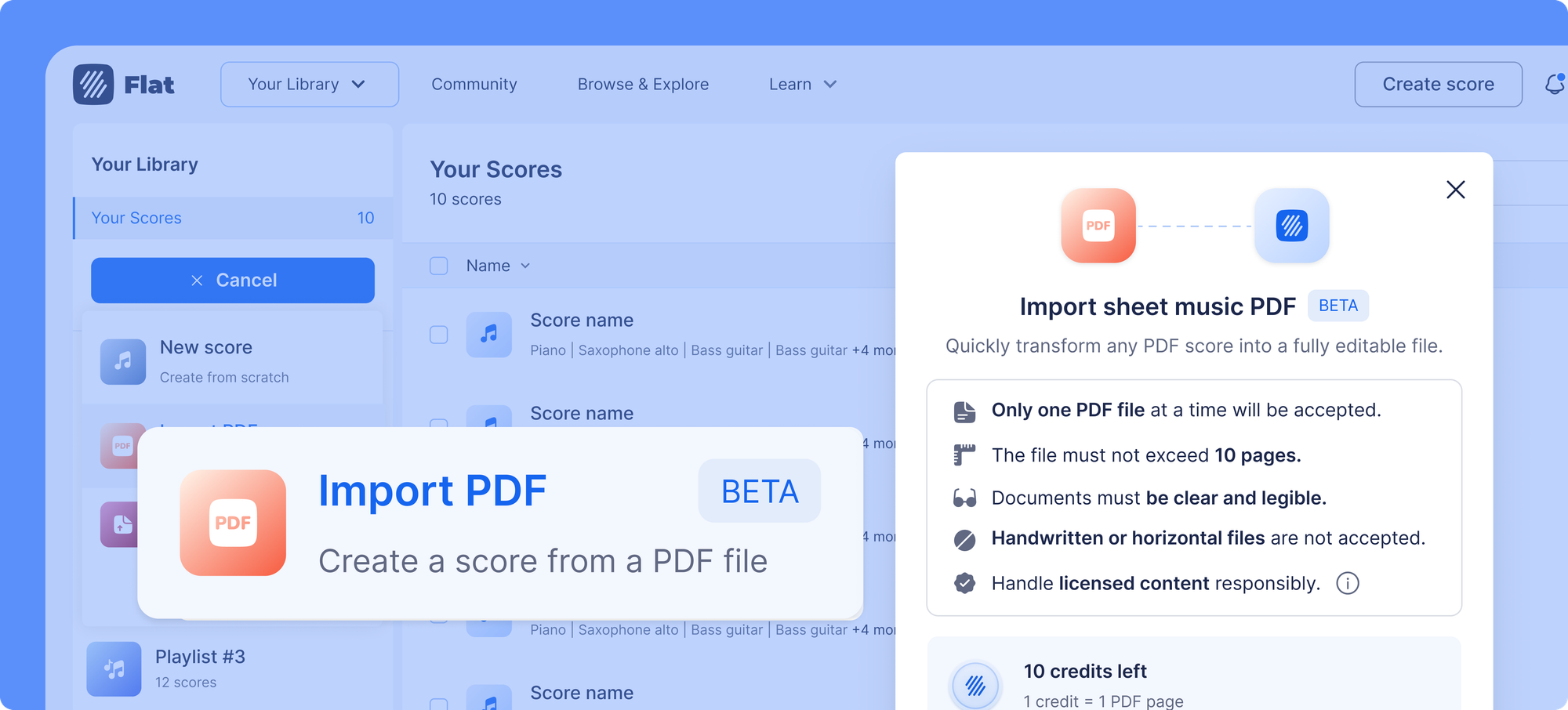
- On the web, start a new score and choose to import a PDF. On the Flat app for iOS or Android, tap to photograph a page with the in-app scanner - it finds the page, crops it, and cleans up the image for you.
- Let Flat read the staves, notes, and symbols.
- Press play. Then edit, transpose, or arrange like any other score.
A clean capture still gives the best results, and some manual touch-ups are normal - but you go straight to editing instead of re-entering a piece note by note. You can also check the full list of supported notations to see what Flat reads today.
Want to see how this fits into a broader import workflow? The post on importing PDF sheet music into Flat walks through the full process, including taking photos on mobile.

Building with the API
If you build on Flat, scanning is available through the API too. Today it runs in automatic mode as part of the standard score-creation endpoint: you send a PDF, Flat runs the same recognition that powers the app, and you get back an editable score. You can see how in the developer docs.
A dedicated OMR import API is on the way - splitting scanning out on its own, with more options to steer the import, much like the in-app controls we are building.
What's next
This is a foundation, not a finish line. Sheet music is, in a real sense, infinite - centuries of composers, instruments, and engraving styles, plus a long tail of rare notations and edge cases - and no model reads every one of them perfectly. So we keep widening what ours can handle, a little at a time.
Because the model is ours, that happens fast: like the rest of our products, we ship small fixes and improvements most weeks - sometimes daily - and regularly fine-tune the model itself as we find new notations and layouts to read better. We are also building a richer experience around scanning: the same automatic import by default, plus optional controls for when you want to steer it - like choosing the instruments up front or picking which pages and parts to import. There is a lot more to come.
Reading your music, and getting better at it
Flat now reads your sheet music with technology we built and trained ourselves - tuned for the notation, the editor, and the playback you already use, and improving with every release. If a scan does not come out quite right, tell us - you can send feedback right in the app after viewing the imported score, or email us at hello@flat.io. We read every piece of feedback - it helps us prioritize what to improve next and is part of how the model keeps getting better.
Ready to turn a page of music into something you can play and edit? Scan your sheet music with Flat right in your browser - no download needed - or bring it to your classroom with Flat for Education.