
Some performances just don't fit a single score. A brass quintet playing together, a guitar class where every student prepared something different, an improvised solo over a backing track. Free Record is a new performance assignment type in Flat for Education built for exactly those. Students record any playing, on audio or video, with no score attached, and hand it straight in for you to review. It sits alongside the classic score-based performance assignment, so you pick the mode that matches the task. Here's what it does, what it's genuinely useful for, and how to set one up.
What is Free Record?
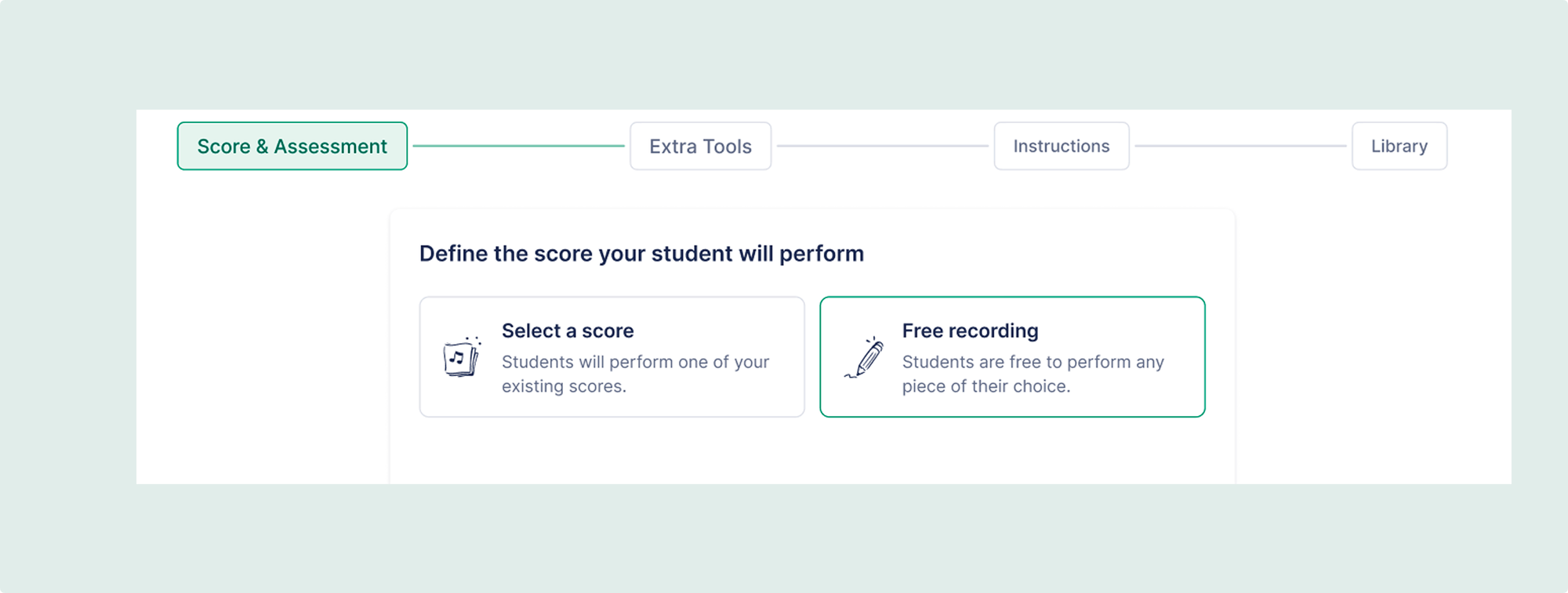
Free Record is a performance assignment where students record themselves without the task being tied to a specific score. They play, save the take, and hand it in, and every submission lands in the same review screen as the rest of your assignments. There's no sheet music to attach and no single instrument part the recording has to match. That's the whole point: it captures the performances a fixed score would otherwise get in the way of.
What Free Record is great for
The feature is simple. Where it earns its place is the assignments that were awkward or impossible before.
- Ensembles and small groups. A jazz combo or a choir sectional records together and hands in a single take you grade as a group, instead of eight separate part submissions.
- Mixed-repertoire playing tests. Set one assignment for the whole class and let each student record the pieces they've prepared at their own level. No building thirty near-identical tasks.
- Improvisation. A solo over a backing track has no notation to play from, so a no-score recording is the natural fit.
- Chair auditions. Students submit their excerpt on video and you rank them from the recordings on your own time, instead of losing rehearsals to live auditions.
- Differentiated classes. When a beginner and a near-portfolio player sit in the same room, each records the repertoire that actually fits them.
When to use Free Record, and when to attach a score
Free Record doesn't replace the classic performance assignment, it complements it. The decision comes down to one question: is the piece fixed? If the whole class is playing the same set study or scale, attach the score, and students get the metronome and tuner in the workspace as they practise. If the performance is varied, improvised, or a group take, Free Record is the faster path.
| Classic performance assignment | Free Record | |
|---|---|---|
| Score attached | Yes, locked to one score | No score needed |
| Best for | A single set piece or scale study | Varied repertoire, improvisation, and ensembles |
| Recording format | Audio (and video) | Audio or video |
| In-workspace tools (metronome, tuner) | Available | Not in this version |
| Teacher review and feedback | Yes | Yes |
One caveat worth knowing: the in-workspace metronome and tuner aren't available inside a Free Record yet. If an assignment depends on a student playing to a click, attach the score for now.
How to set up a Free Record assignment
- Create a new assignment and choose the performance type.
- Choose Free Record instead of attaching a score.
- Add your instructions, set a due date, and pick the class.
- Students record audio or video in the browser, then press Save recording.
- They play the take back and press Hand in when they're happy with it.
- You open each submission, watch or listen, and leave feedback.
Grading and feedback
You grade a Free Record submission the same way you'd grade any performance: against a rubric, with feedback a student can act on. If you want a rubric to start from, our guide to running individual performance assessments lays out a four-part one that works across band, orchestra, and choir. It's worth pairing the recording with a quick reflection, too: set a text-based assignment asking what the strongest moment in the take was and what the student would fix next time. Reading that next to the recording tells you whether they hear what you hear.
Put it to work
Pick one idea from the list, post it before your next rehearsal, and see what comes back. Free Record turns the performances that never fit a single score into a two-minute setup.
Flat for Education comes with a 30-day free trial if you're not set up yet. Start at flat.io/edu.
FAQ
What is Free Record in Flat for Education?
Free Record is a performance assignment type where students record themselves, on audio or video, without the task being tied to a specific score. They play, save the take, and hand it in, and you review it in the same screen as your other assignments. It's built for performances that don't fit a single score, like ensembles, mixed repertoire, and improvisation.
What's the difference between a performance assignment and Free Record?
Both collect a recorded performance you review and grade. A classic performance assignment has a score attached, so the student plays a set piece and can use the in-workspace metronome and tuner. Free Record has no score attached, so students can record varied repertoire, improvisation, or a whole ensemble. Choose based on whether the piece is fixed.
Can a whole ensemble or group submit one recording?
Yes. Free Record isn't tied to a single instrument part, so a small ensemble, jazz combo, or choir sectional can record together and hand in one take that you grade as a group, rather than collecting separate part submissions.
Can students record a performance without sheet music?
Yes. That's what Free Record is for: students record any performance with no score attached, which suits improvisation, mixed repertoire, and ensemble playing that doesn't map to a single part.
Can students record video, or only audio?
Both. Students can record either audio or video directly in the browser, then save the take and hand it in. Video is handy for assessments where you want to see technique or posture, not just hear the playing.