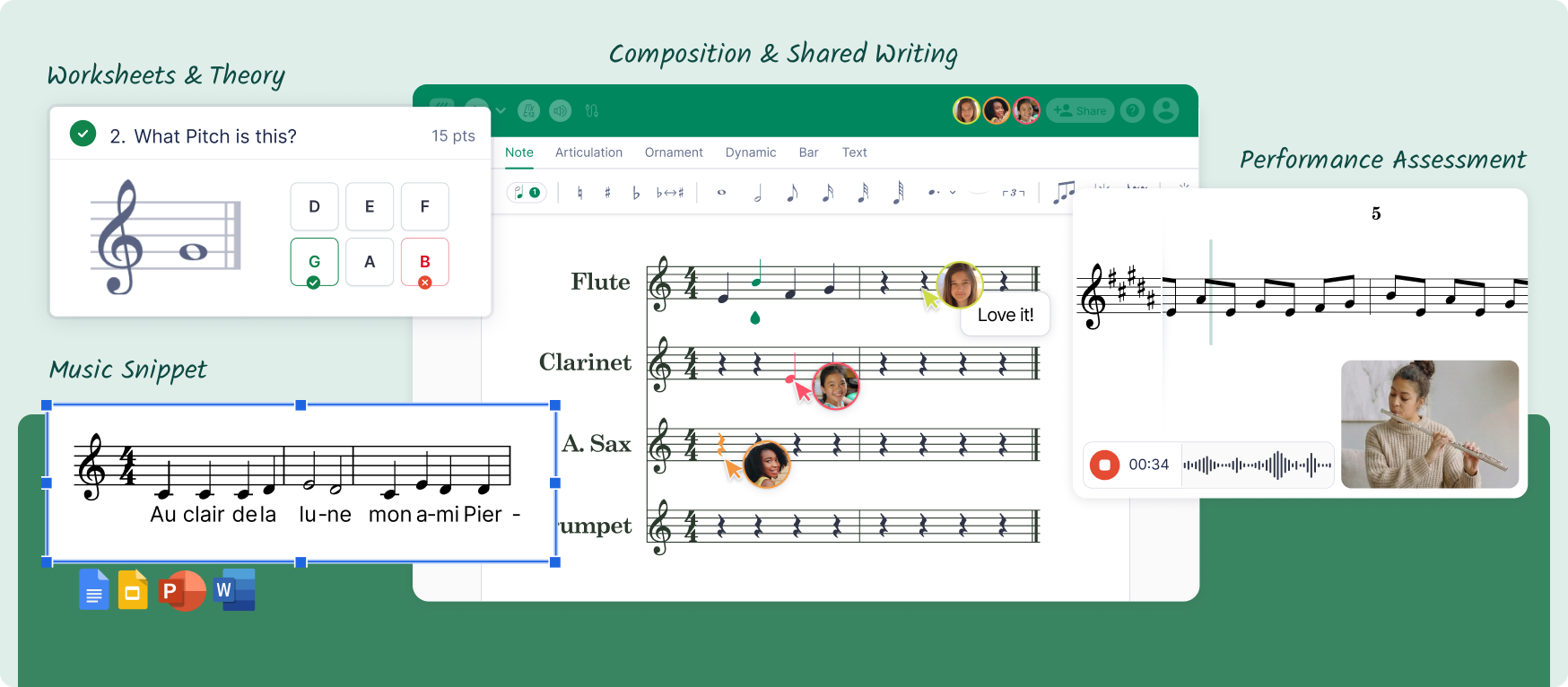
Flat for Education helps teachers set composition assignments, collect performance recordings and assign auto-marked theory and interval ear-training worksheets. Music Snippet adds notation to Google Docs, Slides, Word and PowerPoint. Together, they support GCSE/ IGCSE and A-level music teaching, from preparing classroom materials to reviewing pupil work.
Here's how that looks in a normal week. On Monday you're building a revision sheet on cadences, and you want the examples to show real notation. By Thursday you're chasing eight composition drafts, a handful of performance recordings, and a class who still mix up a perfect fourth and a perfect fifth by ear.
Those are two different jobs: preparing clear written materials, and setting and reviewing the work pupils do. Flat for Education and Music Snippet each handle one of them well, and between them they support teaching across composition, performance, theory and listening.
Two tools, two jobs
It helps to be clear about which tool does what before you plan a term around them.
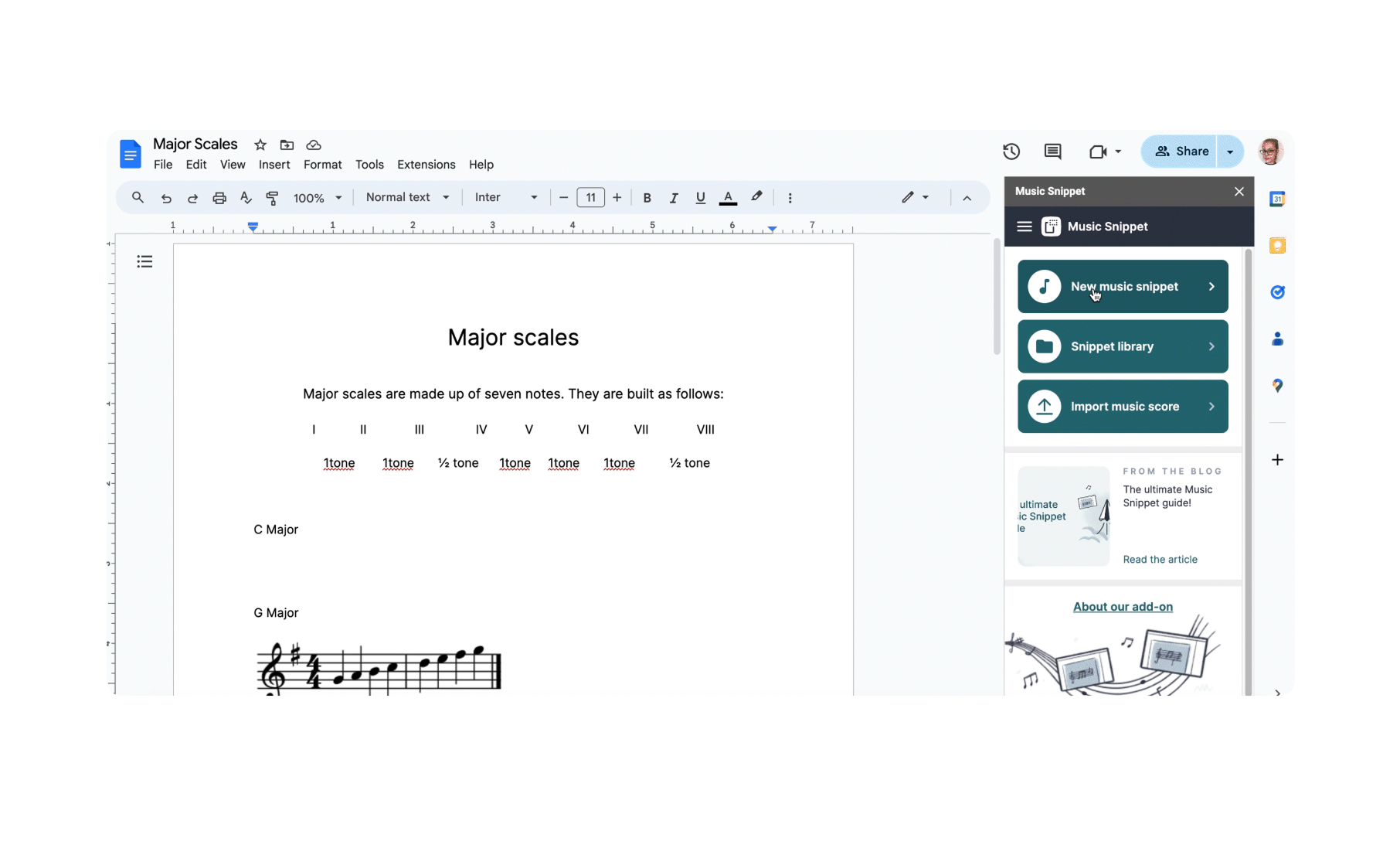
Music Snippet is the Flat notation add-on for Google Docs, Slides, Word and PowerPoint. You create the notation from within your document or presentation and insert it directly into your teaching materials, without taking screenshots from a separate notation application.
Flat for Education is the browser-based classroom platform. Pupils compose, record performances and complete assignments; you set the tasks, open drafts and give feedback in one place.
In short: use Music Snippet to add notation to teaching materials, and Flat for Education to set, collect and review pupil assignments.
Prepare teaching materials with Music Snippet
Most GCSE/IGCSE and A-level teaching leans on handouts: harmony exercises, listening questions, chord labelling, set-work analysis. The awkward part has always been the notation. Rebuilding examples by hand eats your evening, and screenshots from another application are fiddly to make and keep tidy.
With Music Snippet you create the notation inside the document you're already writing and insert it directly. A cadence worksheet in Google Docs can include the chords themselves. A set-work slide in PowerPoint can carry the exact bars you want pupils to annotate.
Because it works inside Docs, Slides, Word and PowerPoint, it fits whatever your department already uses. You're not moving your materials into a new system. You're adding notation to the one you have.
Set composition tasks in Flat for Education
Composition is where pupils need to hear their ideas and where you need to watch the work develop. In Flat for Education, a composition assignment can start from a score template, so everyone begins from the same brief and starting material. You can keep supplied notes fixed with the template lock, and choose which notation tools pupils have.
The part that matters most is feedback. On a practice task, you can open a draft, play it back, and respond to one decision the pupil can actually hear and act on. That's the difference between "add more variety" and "the idea stalls at bar nine; what could carry it forward?"
The feedback examples here describe classroom practice tasks. For formally assessed GCSE/IGCSE Music or A-level work, follow your exam board's current rules on permitted feedback, supervision, authentication and submission.
Collect performance practice recordings in one place
Performance practice usually means recordings, and recordings usually mean a scatter of files in different formats. In Flat for Education, a performance assignment lets pupils record audio or video and submit it for review. Use a score-based assignment when the task uses a particular score, or Free Record for a performance without one.
Keep the goal narrow. "Record the transition into bar nine and listen for a steady pulse" gives you something specific to respond to. Free Record has a 10-minute limit per submission, which is plenty for a practice passage, and it keeps each recording tied to the pupil and the task rather than lost in a shared drive.
For a final assessed performance, check your exam board's separate requirements for how recordings must be made, supervised and submitted.
Build aural and theory foundations across both tools
Appraising and aural work is where the two tools pull together. Flat for Education's auto-marked ear-training worksheets focus on interval identification, so pupils get regular practice and you can see who hears the difference without marking a stack of books. Its theory worksheets cover interval, key, chord and rhythm exercises.
For everything a worksheet doesn't cover, Music Snippet fills the gap. Build a listening sheet in Google Docs with the melodic fragments pupils are identifying. Write a harmony question in Word with the chords printed clearly. The auto-marked practice handles the drilling; the Music Snippet handouts handle the wider appraising work that needs context, notation and your own questions.
Take it further at A-level
A-level asks for more independence, depth and analysis, and the same two tools stretch to meet it. For a practice activity, prepare a short score extract with Music Snippet and ask students to analyse its harmonic movement in a document. Then set a separate composition exercise in Flat for Education where they explore a harmonic approach of their own and explain the decisions they made.
This is a teacher-created practice activity, not a supplied exam-board resource. It shows the step up from GCSE: students are analysing, composing and justifying, rather than completing a set exercise.
A term of teaching that connects the two
Here's one way to run a short teaching unit using both:
- Write the unit's revision and listening materials in Google Docs or Slides, inserting notation with Music Snippet.
- Set a composition task in Flat for Education from a shared template, and open drafts for feedback before the deadline.
- Set an interval ear-training worksheet to check the listening skill the unit depends on, and use the results to decide what to revisit.
- Collect a short performance practice recording against one clear goal, and reply with a next step.
- Distribute and track it through the system you already use. Flat for Education integrates with Google Classroom, Microsoft Teams, Canvas, Schoology and MusicFirst.
None of this asks you to move your whole course online. You prepare the materials where you already work, and run the pupil-facing tasks where feedback and recordings stay together.
Which tool for which task
| Teaching area | Use Music Snippet for | Use Flat for Education for |
|---|---|---|
| Composing | Printed briefs and notated examples in handouts | Draft composition tasks, playback and feedback |
| Performing | Notated passages in practice sheets | Audio or video practice recordings, feedback on one goal |
| Appraising & aural | Listening sheets and exam-style questions with notation | Auto-marked interval ear-training and theory worksheets |
| Revision | Notation-rich revision handouts in Docs and Slides | Assigning and tracking practice through your LMS |
How the two products fit together
When your accounts are connected, Music Snippet is included with a Flat for Education subscription. Check the current setup steps and any plan conditions in the Flat for Education help centre before relying on it, so the two products work together as one workflow.
Try it with your next music lesson
Start with one task you already teach: a composition exercise, an interval worksheet or a short performance recording. Set it in Flat for Education and review your pupils' work in one place.
Preparing a handout or presentation too? Explore Music Snippet to add notation directly to your teaching materials.
FAQ
What is the difference between Flat for Education and Music Snippet?
Flat for Education is a browser-based classroom platform where pupils complete composition, performance and worksheet assignments and teachers give feedback. Music Snippet is an add-on that inserts notation into Google Docs, Slides, Word and PowerPoint. Use Music Snippet to prepare teaching materials and Flat for Education to set, collect and review pupil work.
Can I use them for both GCSE and A-level music?
Yes. Both support teaching across composition, performance, theory and listening at GCSE and A-level. The same workflows scale up, with A-level tasks asking for more independence, sustained development and analysis.
Which activities are automatically marked?
Theory and interval ear-training worksheets can be automatically marked. Teachers review composition assignments and performance recordings themselves.
Can I use them for formally assessed coursework?
You can use them for teaching and practice around coursework. For formally assessed work, follow your exam board's current rules on permitted feedback, supervision, authentication and submission.
Is Music Snippet included with Flat for Education?
When your accounts are connected, Music Snippet is included with a Flat for Education subscription. Check the current setup steps and any plan conditions before relying on it.
More in the UK GCSE and A-level series
- GCSE music composition ideas pupils can build on
- How to teach GCSE and A-level composition beyond the first eight bars
- GCSE music theory and aural practice that shows you what to teach next
- Recording GCSE and A-level music practice so feedback leads somewhere
- Best music notation software for UK schools in 2026